pickr
Pickr.
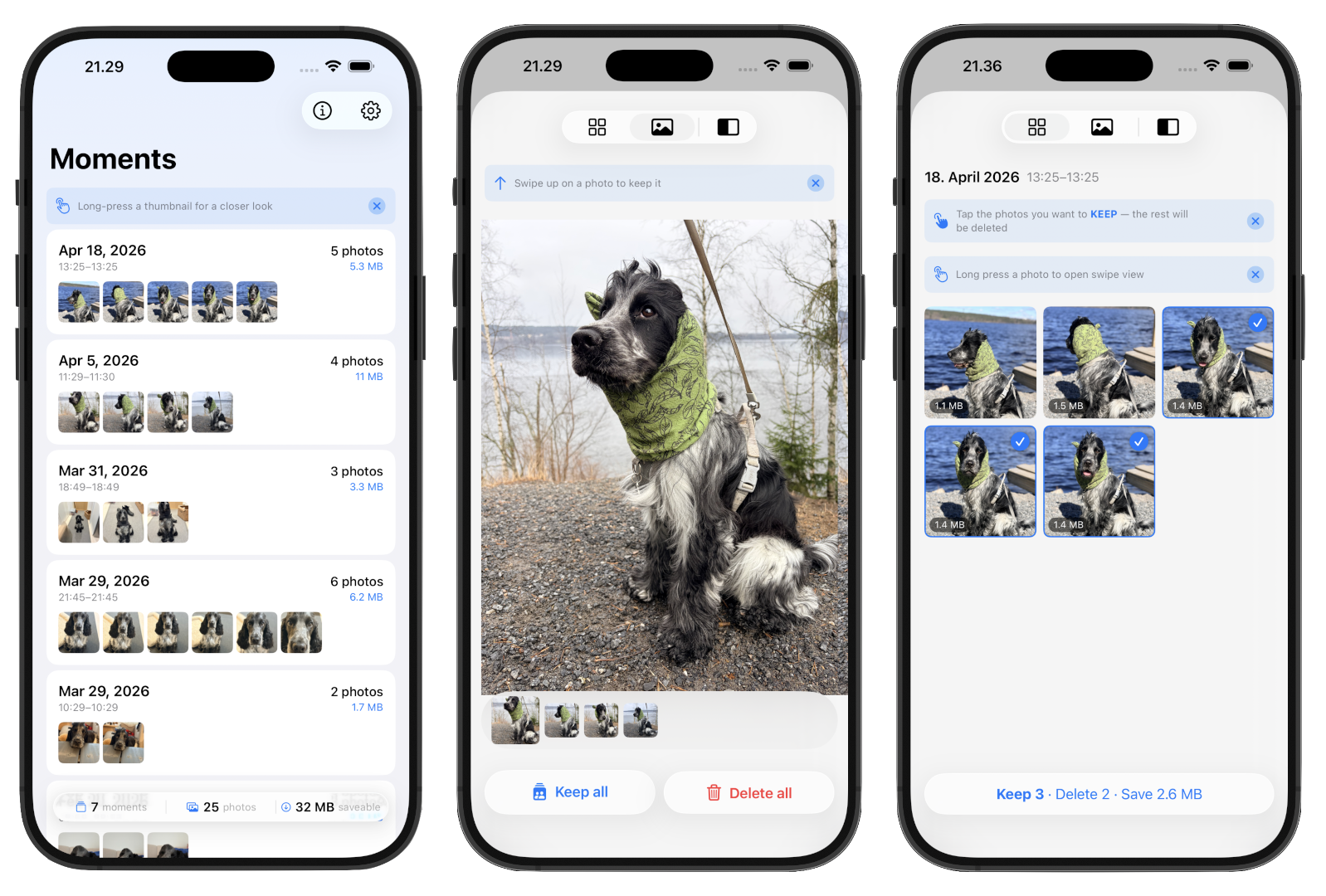
The fastest way to clear burst shots and near-duplicates from your iPhone camera roll. 100% on-device.
Pickr. groups near-duplicate photos by when they were taken, lets you tap the keepers, and sends the rest to Recently Deleted in one action. No accounts, no cloud, no AI.
App Store: coming soon Requires: iPhone running iOS 18 or later.
How it works
- Pickr. scans your photo library using EXIF timestamps.
- Photos taken within a short window (default: 1 minute) are grouped as a moment.
- You tap the ones you want to keep. Everything unselected is queued for deletion.
- Confirming moves the rest to the system Recently Deleted album — reversible for 30 days.
No photos, metadata, or identifiers ever leave your device.
Features
- Swipe a moment left to delete all of its photos, or right to keep the whole moment aside so it stops appearing — both with a quick confirm prompt so nothing happens by accident
- Two ways to review a moment: a grid view for tap-to-keep, or a swipe view for one-photo-at-a-time decisions with a Kept/Removed toggle
- Long-press any photo for a full-resolution peek
- Time window presets: 10s / 30s / 1m / 3m, or slide to any value between 1 and 120 minutes
- Scan the last 7, 14, or 30 days, your whole library, or a custom date range
- Restore kept-aside photos anytime from Settings → Kept moments
- Lifetime stats: photos deleted, space reclaimed, moments cleared
Privacy
Pickr. is designed so your photos never leave your device.
- No servers. No analytics. No tracking. No third-party SDKs.
- No accounts, no sign-in.
- No face recognition, machine learning, or AI analysis.
- Photo library access is used only to read metadata for grouping and to move your selected photos to Recently Deleted.
Full policy: privacy.md
Support
Found a bug or have a feature request? Email 54-onrush-clones@icloud.com.
License
© 2026 Juha Ylitalo. All rights reserved.